
- Gangster Themed Cinematic -
Tools:


Duration:
4 months
Team Size:
1 (solo)
Asset Integration
Unreal Engine
Blueprinting
Project Description:
A nearly 3-minute long cinematic within Unreal Engine that showcases a design-focused integration of camera work, lighting, sound and visual effects, as well as a playback feature. All working together to fulfill a chosen theme "Gangster" and a given setting.
My Role:
This project had me explore the different aspects that go into a setting in order to create a desired theme or tone. To achieve this, I used reference material and researched the different aspects I could use to compile an accurate and interesting scene. Additionally, I used blueprinting to create a playback system within the cinematic.
Planning
Given the theme "gangster," my first step was to research the different eras of gangsters portrayed in various films and games I am familiar with. To gain a visual understanding of what I wanted to create, I assembled a mood board that allowed me to see the common color schemes and lighting that were seen in this theme's setting.

Theme Mood Board
After understanding the tone I wanted to convey, I listed out the prominent features. I used them as a guide for the desired lighting, a color scheme, and even the hero prop that is showcased within the cinematic. This allowed me to focus on curating a specific tone throughout the entire setting to keep it consistent.
Unreal Blueprinting
This project allowed me to get more familiar with Unreal's blueprint system and how it operates with the rest of the engine's interface.
To implement a media control system in the cinematic, I used a variety of nodes to create the functionality of actions such as:
-
Pause
-
Play
-
Fast-Forward
-
Rewind

Pause & Play Events

Fast-Forward & Rewind
Click Images to Magnify

Camera System Structure
For the cinematic itself, I created custom events that would iterate through each camera in order and trigger any corresponding actions such as fading to color, changing focal distance, and other keyframe moments.
This system allowed for a straightforward approach that was visually easy to work with. With each of the camera's timelines listed out in order, I could quickly jump wherever I needed in the cinematic to add or adjust the moments within it.

Process of displaying camera in system (Cam #1)
Click Image to Magnify
The Features
Personal Takeaways


Ambient Sound Distribution
Fireplace VFX

Camera
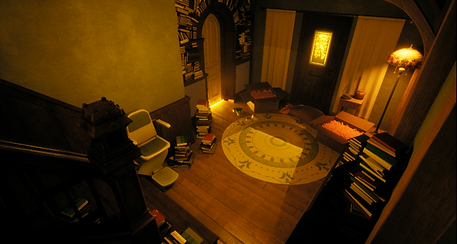
I learned how to use Unreal's camera system and its features, allowing for various panning shots, manipulating focal distances, FOV, and fading moments to make for a pleasing view of the setting and visuals that had been added. I also opted for higher film grain to capture the more aged perspective that was common with older gangster/mafia movies. This project allowed me to experiment with creative camera angles and setting changes to push the capabilities of the camera system.


Sound & VFX
Since I themed this scene without adding any props (other than the hero prop) or characters, sound was an important aspect to get across what was going on in the scene. I added various sound effects that were relevant to the theme with the intention of having them be coherent and avoid standing out.
To complement the sound, visual effects were added to further the theme's context. I utilized practical places that would have effects, such as flames in the fireplace and dust particles in the air, giving a sense of reality and movement to the otherwise static space.

Line to represent where cameras can be angled, only in a direction from one half.

Line to represent where cameras can be angled, only in a direction from one half.
Line to represent where cameras can be angled, only in a direction from one half.
Camera 50/50 angle line
Playback System / UI
I created a playback system alongside UI to allow users of the project to pause, play, rewind, and the ability to cut to the next or previous camera within the cinematic. I also decided to theme the UI elements to keep it consistent with the chosen theme.
-
Gained experience working within Unreal and exploring its blueprinting system.
-
My ability to not only integrate cinnamic aspects into Unreal but to combine them to create a themed cinematic.
-
Gained experience working with a camera system and utilizing its capabilities in interesting ways.
Showcase


Some still shots within the cinematic